Project Overview & Workflow
Each assigned processing form contains exactly 15 input fields. To execute operations successfully within the software, you must have a strong, stable live internet connection.
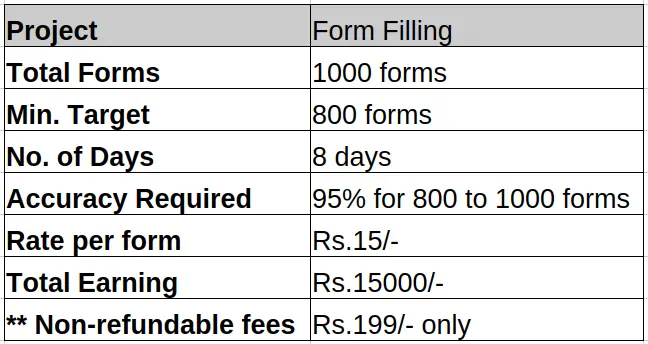
**Note: If the project is successful with payment than no fees required for next project. But, if project is not submitted or no accuracy achieved then you have to pay the fees again if required next project. It will be your decision to continue further or not.
Demo Video Presentation: Review our software execution steps below:
Types of Errors
The system evaluation parameters are highly sensitive. Ensure your typing entries avoid these error classifications:
| Error Category Type | Description and Impact Details |
|---|---|
| Punctuation Error | Missing, misplaced, or extra dots, commas, symbols, or hyphens. |
| Spelling Error | Incorrectly typed characters or misspelling words from source texts. |
| Case-Sensitive Error | Mismatching uppercase or lowercase letters against image characters. |
| Word Missing / Extra Word | Skipping words entirely or typing unlisted extra phrases. |
| Space Missing / Extra Space | Adding double blank gaps or leaving out required spaces between words. |
| Column Missing | Leaving fields blank or pasting text columns inside the wrong inputs. |
Accuracy Reports & Performance Evaluation
QC center will check the forms in the submission. While checking if the accuracy goes below the minimum accuracy required for qualifying then the QC center will not be responsible for the further checking of the forms.
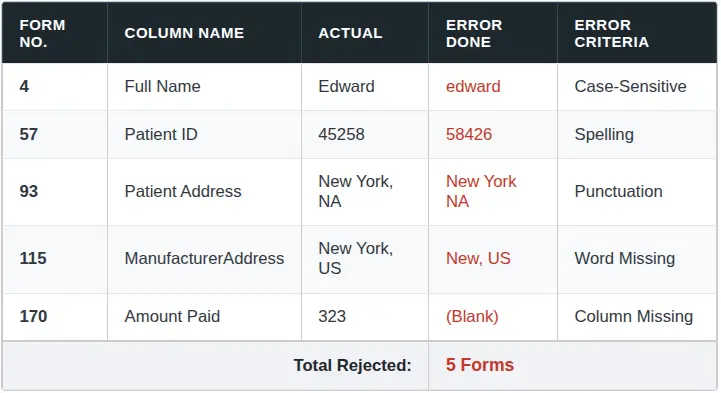
Reference Image: Sample view of the Quality Control (QC) Accuracy Report.
Technical Instructions for Data Entry
To avoid processing penalties, follow these exact data entry rules:
- Always hit the "Add New Record" button for every individual serial number.
- Verify that every field data completely matches the corresponding field data displayed in the images.
- Always type data aligned to the left margin, regardless of formatting inside images.
- Do not type special accent items. Convert Latin characters to flat base letters (e.g., type "æ" as "ae", "Ç" as "C", "Ŷ" as "Y", "ķ" as "k").
- Always type data as standard text. Bold style formatting or italic layout variants are not supported.
- If a word is split in the image file, the same should be done in the form. No justifications should be done between what should be right and what should be wrong. Just type as it is given in the image files.
Critical File Rejection Criteria
Submissions are rejected immediately under any of the following conditions:
- If the file name of the submitted file doesn't match with the file name sent.
- If any other file/folder found other than the needed file.
- If the file submitted is not in required format.
- If the form has not been submitted within the deadline mentioned by the company.
- Accent Characters used in the transcribed Data.
- If the File bearing the Submission of the Transcribed Data does not bear the Extension ‘.pdf‘ or bears any other Extension.
- If forms are not typed in Company Software or Junk data is submitted.
- Rejection at any stage would preclude any further submission of the same Transcribed Data, and other stages shall be forfeited.
Contract Termination Clauses
Your contract will be terminated immediately in the following cases:
- If you are found using any third party application other than the application provided by the company, including but not limited to Microsoft Excel or any other program in Microsoft Office or Auto-typing software or Scripts or other AI tools.
- If you are found to be forwarding the data files to any other email address other than the email address of the company or if you are found to be giving/sharing/leaking the data to anyone else who is not directly or indirectly involved with the company by any means.