Project Overview & Workflow
Each assigned image text file contains between 50 to 55 lines. Since it runs inside an offline software model, you can complete tasks comfortably without internet connectivity worries.
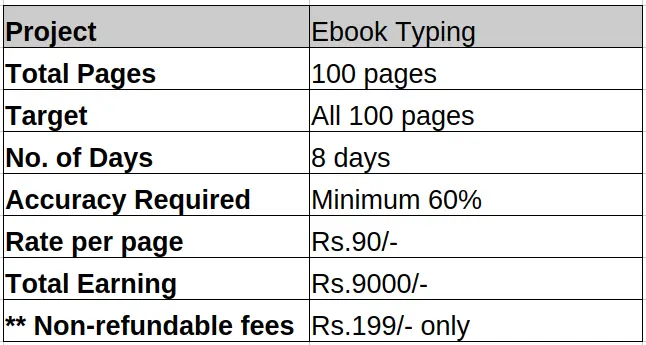
**Note: If the project is successful with payment then no fees required for next project. But, if project is not submitted or no accuracy achieved than you have to pay the fees again if required another project. It will be your decision whether to continue further or not.
Demo Video Presentation: Watch our software setup and working tutorial video below:
Accuracy Parameters
Each error will be calculated exactly as specified in the table below across the total 100 pages set. Kindly ensure that accuracy rules are closely followed:
| Type of Error | Measurement Bounds | Deduction % per Error |
|---|---|---|
| Punctuation | In Whole 100 Pages. | 0.80% |
| Spelling | In Whole 100 Pages. | 0.90% |
| Case-Sensitive | In Whole 100 Pages. | 0.60% |
| Word Missing / Extra Word | In Whole 100 Pages. | 0.90% |
| Space Missing / Extra Space | In Whole 100 Pages. | 0.70% |
| Enter Missing / Extra Enter | In Whole 100 Pages. | 0.70% |
| Line Missing / Extra Line | In Whole 100 Pages. | 2.00% |
The undermentioned percentage of total errors in the projects will not be eligible for payments:
1) Total Errors above 40%
QC Center Evaluation Protocols
Our dedicated Quality Control (QC) center will check the pages in the submission. While checking, if the accuracy goes below the minimum 60% accuracy required for qualifying, the QC center will not be responsible for further checking of the same workload.

Reference Image: Sample view of the generated Ebook Typing QC Error Report.
Technical Instructions for Ebook Transcriptions
To ensure perfect file approvals, follow these explicit typing rules:
- Users are required to make individual .dxt text files for every provided image file.
- Every line typed inside the .dxt file must match perfectly with the corresponding line in the reference image; this keeps the pages automatically synchronized.
- If a line ends in the image file, you must hit Enter to end the line in the .dxt file as well.
- Everything must be typed with strict left alignment, regardless of formatting inside the image files.
- Convert accent symbols or Latin characters into normal characters (e.g., type "æ" as "ae", "Ç" as "C", "Ŷ" as "Y", "ķ" as "k").
- Always type using default plain software text. Special bold styling or italic rules are not required and are not possible to process.
- If a word is split across lines with a hyphen in the image file, replicate it exactly inside your text documents. Just type everything exactly as given.
Critical Rejection & Forfeiture Criteria
Your work will face instant rejection if any of these conditions are met:
- If the file name of the submitted file does not match with the file name of the source image file.
- Incomplete or empty .dxt document records are found in the package.
- If any other random file or folder is found inside your submitted compressed Zip folder.
- The final data files do not carry the compulsory .dxt file extension format.
- The completed project has not been submitted within the deadline mentioned by the company.
- Accent characters or special formatting markers are left inside the transcribed data body.
- The transcription work is completed outside the official company-provided text program app.
- Rejection at any stage precludes further submission of the same data, and other stages shall be forfeited.
Contract Termination Conditions
Your workspace account access contract will face immediate termination if:
- You are found using any third-party tool or text editor outside our software (including Microsoft Word, Office apps, auto-typers, macros, or external script engines and AI tools).
- You copy, forward, or leak files to any unapproved email address or share project access with external parties.
- More than 1 Computer (Desktop or Laptop) is found being used to complete your assigned workload.