(1)Form Filling Project and (2)Ebook Typing Project
(1) Form Filling Project
Payment Schedule For Form Filling :-
800 to 1000 forms – 95 to 100% Accuracy Achieved = (Rs.15 per correct form)
Below minimum required accuracy or below 800 forms submission = No Payment.
Project Requirements:-
1. Computer (Desktop or Laptop) with Microsoft Windows 7 or above Operation System version.
2. 1-mbps or above Internet Connection Speed.
Form Rejection Criteria:-
| Types of Error |
| Punctuation Error |
| Spelling Error |
| Case-Sensitive Error |
| Word Missing/Extra Word Error |
| Space Missing/Extra Space Error |
| Column Missing |
Accuracy Report:-
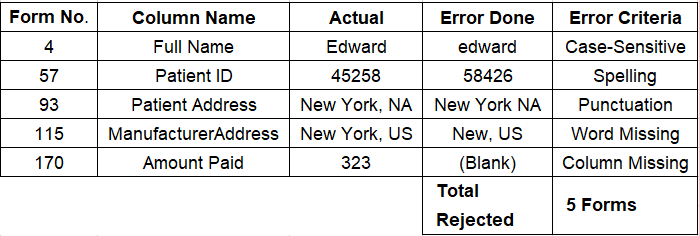
QC center will check the forms in the submission. While checking if the accuracy goes below the minimum accuracy required for qualifying then the QC center will not be responsible for the further checking of the forms.
Note:-
As seen in the sample accuracy report above. In the same way a report will be generated and it will be forwarded to the second party by the first party showing which mistakes are there in which column on which form number and according to the company’s method of calculating accuracy what type of error it is and hence how much % is deducted in terms of accuracy. We will send you the Error Report in seven working days after the submission of your Workload. If the QC Center will find any Error in the data submitted then they will send you the Error Report. If the Agent gets below required accuracy level then he is not eligible for Payments.
Contract Termination:-
Contract would be terminated in the below mentioned cases
* If you are found using any third party application other than the application provided by the company, including but not limited to Microsoft Excel or any other program in Microsoft Office or Auto-typing software or Scripts or other.
* If you are found to be forwarding the data files to any other email address other than the email address of the company or if you are found to be giving/sharing/leaking the data to anyone else who is not directly or indirectly involved with the company by any means.
Submission Rules:-
* Submission should be made only on the company’s official email address.
* Submission should be made exactly on or before the deadline given by the company.
* File name of the submitted file should exactly match.
* Submission should be made of minimum 800/1600 forms (as per plan selected) strictly. Submission should be made in .pdf file format.
* The submitted files should be found complete with minimum 800/1600 (as per plan selected) form entries. Any submission below 800/1600 (as per plan selected) forms will not be accepted.
Technical Instructions:-
* User is required to Add new record for each serial number.
* Every fields in the form should match in the image.
* Everything should be typed with left alignment, whatsoever may be in the image file.
* Latin Characters or Accent Characters, if any, shall be typed as normal characters.
Ex: “æ” should be typed as “ae”, “Ç”should be written as “C”, “Ŷ” should be written as “Y”, “ķ” should be written as “k” etc.
* Always type the text as default text in software. Bold, Italics in software File is not at all required and is not possible also.
* If a word is split in the image file, same should be done in the form. No justifications should be done between what should be right and what should be wrong. Just type as it is given in the image files.
Rejection Criteria:-
* If file name of the submitted file doesn’t match with the file name sent.
* If any other file/folder found other than the needed file.
* If the file submitted is not in required format.
* It the form has not been submitted within the deadline mentioned by the company.
* Accent Characters used in the transcribed Data.
* If the File bearing the Submission of the Transcribed Data does not bears the Extension ‘.pdf ‘or bears any other Extension.
* If forms are not typed in Company Software or Junk data is submitted.
* Rejection at any stage would preclude any further submission of the same Transcribed Data, and other stages shall be forfeited.
Payment Terms:-
* Payment will be transferred by Net banking / UPI on the same day when the accuracy report is sent.
* Payment will be transferred only if the minimum required accuracy is achieved.
(2) Ebook Typing Project
Payment Schedule For Ebook Typing:
80% to 100% Accuracy Achieved = Rs.9,000/- (Rs.90 per Page)
60% to 79.99% Accuracy Achieved = Rs.5,000/- (Rs.50 per Page)
1% to 59.99% Accuracy Achieved = No payment.
Accuracy Parameters:-
| Type of Error | Pages | Deduction |
| Punctuation Error | In Whole 100/200/400 Pages. | 0.80% |
| Spelling Error | In Whole 100/200/400 Pages. | 0.90% |
| Case-Sensitive Error | In Whole 100/200/400 Pages. | 0.60% |
| Word Missing/Extra Word Error | In Whole 100/200/400 Pages. | 0.90% |
| Space Missing/Extra Space Error | In Whole 100/200/400 Pages. | 0.70% |
| Enter Missing/Extra Enter Error | In Whole 100/200/400 Pages. | 0.70% |
| Line Missing/Extra Line Error | In Whole 100/200/400 Pages. | 2.00% |
Kindly ensure that the Accuracy Parameters are maintained as per the payment schedule for the Projects. Each errors will be calculated as mentioned in the Accuracy Parameters.
The undermentioned percentage of total errors in the projects will not be eligible for payments.
1) Total Errors above 40%
Accuracy Report:-

QC center will check the pages in the submission. While checking if the accuracy goes below the minimum accuracy required for qualifying then the QC center will not be responsible for the further checking of the same.
Note:- As seen in the sample accuracy report above. In the same way a report will be generated and it will be forwarded to the second party by the first party showing which mistakes are there in which line on which page number and according to the company’s method of calculating accuracy what type of error it is and hence how much % is deducted in terms of accuracy. We will send you the Error Report in 07 working days after the submission of your Workload. New Workload will be given to you after the Completion of the Given Workload.
If the QC Center will find any Error in the data submitted then they will send you the Error Report. If the Agent gets below required accuracy level then he is not eligible for Payments.
Contract Termination:-
Contract would be terminated in the below mentioned cases.
* If you are found using any third party application other than the application provided by the company, including but not limited to Microsoft Word or any other program in Microsoft Office or Auto-typing software or Scripts or other.
* If you are found to be forwarding the data files to any other email address other than the email address of the company or if you are found to be giving/sharing/leaking the data to anyone else who is not directly or indirectly involved with the company by any means.
* If more than 1 Computer (Desktop/Laptop) is used to complete the work.
Submission Rules:-
* Submission should be made only on the company’s official email address.
* Submission should be made exactly on or before the deadline given by the company.
* File names of the submitted file should exactly match with image files.
* Submission should be made of all pages strictly. Submission should be made in zip folder.
* The zip folder of the submitted files should not contain any other file/folder.
* All the submitted files should be found complete. Any incomplete file should not be found in the submission folder
* All the Submitted files should be in .dxt format
Technical Instructions:-
* User is required to make individual .dxt files for every image files.
* Every line of the dxt should match with the corresponding line in the image; hence the pages shall automatically match with the image file pages.
* Everything should be typed with left alignment, whatsoever may be in the image file.
* Latin Characters or Accent Characters, if any, shall be typed as normal characters.
Ex: “æ” should be typed as “ae”, “Ç”should be written as “C”, “Ŷ” should be written as “Y”, “ķ” should be written as “k” etc.
* Always type the text as default text in software. Bold, Italics in software File is not at all required and is not possible also.
* If a word split in the image file, same should be done in the dxt file. No justifications should be done between what should be right and what should be wrong. Just type as it is given in the image files.
* If a line ends in the image files, same should be done in the .dxt file.
Rejection Criteria:-
* If file name of the submitted file doesn’t match with the file name of image file.
* Incomplete .dxt files found.
* If any other file/folder found in the Zip folder other than the needed .dxt files
* If the file submitted is not in .dxt format.
* If the completed job files has not been submitted within the deadline mentioned by the company.
* Accent Characters used in the transcribed Data.
* If the File bearing the Submission of the Transcribed Data does not bears the Extension ‘.dxt’ or bears any other Extension.
* If transcribed text is not typed in Company Software.
* Rejection at any stage would preclude any further submission of the same Transcribed Data, and other stages shall be forfeited.
Payment Terms:-
* Payment will be transferred by Net banking / UPI on the same day when the accuracy report is sent.
* Payment will be transferred only if the minimum required accuracy is achieved.